🧱Creational
1) Singleton
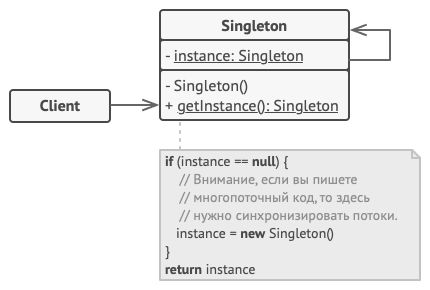
🧭Purpose:
Ensures that the system has only one instance of a class and provides a global access point to it.
⚙When to use:
– configuration management classes;
– logging classes;
– database connection pools.
🎯Key advantages:
- Guaranteed single instance
The class ensures that only one object is created, regardless of how many timesgetInstance()is called. - Global access point
The object is accessible anywhere in the program via a static method — convenient when a shared state is needed (e.g., configuration settings). - Lazy initialization
The instance can be created only when it’s actually needed (saves resources). - Control over resource access
If, for example, the Singleton manages a connection pool, it can guarantee safe access to a shared resource. - Compatible with Factory / Builder patterns
Often used together — for example, a factory implemented as a Singleton to centralize object creation.
⚠ Disadvantages:
- Hidden global dependency
A Singleton effectively becomes a “global variable.”
This complicates testing and violates the Dependency Inversion Principle (D in SOLID). - Difficulties with unit testing
If a class directly accesses the Singleton, it’s hard to replace it with a mock.
You’ll need to use reflection tricks or dependency injection. - Multithreading issues
Without proper thread safety (synchronized, double-checked locking), multiple instances can be created accidentally. - Tight coupling and SRP violation
The class creates, stores, and manages itself — three responsibilities in one place. - Hard-to-control lifecycle
The object lives throughout the program’s runtime. If the Singleton holds something in memory, you’ve got a guaranteed memory leak.
Example:
public class Logger {
    private static Logger instance;

    private Logger() {} // private constructor

    public static synchronized Logger getInstance() {
        if (instance == null) {
            instance = new Logger();
        }
        return instance;
    }

    public void log(String msg) {
        System.out.println(msg);
    }
}
Using:
Logger.getInstance().log("Started app...");2) Factory Method
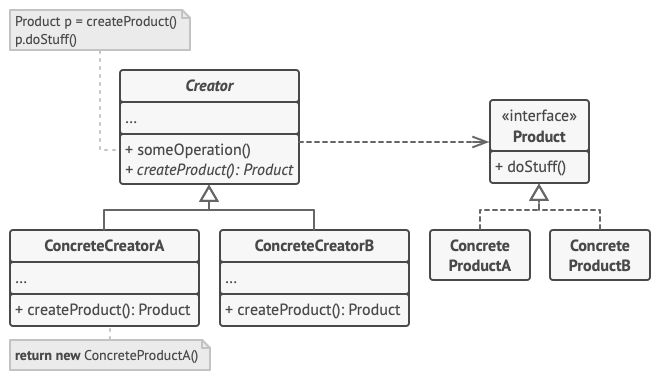
🧭Purpose:
Delegates object creation to subclasses without specifying the exact type.
⚙When to use:
– Spring Bean Factory, Hibernate SessionFactory;
– creating different types of objects that share a common interface.
🎯Key advantages:
⚠ Disadvantages:
Example. Option A.
// Vehicle.java
public abstract class Vehicle {
    protected Vehicle() { } // subclasses will be able to call `super()`
    public abstract void printVehicle();
}
// TwoWheeler.java
public class TwoWheeler extends Vehicle {
@Override
public void printVehicle() {
System.out.println("I am two wheeler");
}
}// FourWheeler.java
public class FourWheeler extends Vehicle {
@Override
public void printVehicle() {
System.out.println("I am four wheeler");
}
}// VehicleFactory.java
public abstract class VehicleFactory {
// The Factory Method decides which Vehicle to create (in subclasses)
protected abstract Vehicle createVehicle();
// Common logic that uses the product
public void deliver() {
Vehicle v = createVehicle();
System.out.print("Delivering vehicle: ");
v.printVehicle();
}
}// TwoWheelerFactory.java (Concrete creator)
public class TwoWheelerFactory extends VehicleFactory {
@Override
protected Vehicle createVehicle() {
return new TwoWheeler();
}
}// FourWheelerFactory.java (Concrete creator)
public class FourWheelerFactory extends VehicleFactory {
@Override
protected Vehicle createVehicle() {
return new FourWheeler();
}
}// App.java
public class App {
public static void main(String[] args) {
VehicleFactory bikeFactory = new TwoWheelerFactory();
VehicleFactory carFactory = new FourWheelerFactory();
bikeFactory.deliver(); // Delivering vehicle: I am two wheeler
carFactory.deliver(); // Delivering vehicle: I am four wheeler
}
}Example. Option B. Simple Factory Method
// Vehicle.java
public abstract class Vehicle {
    protected Vehicle() { }
    public abstract void printVehicle();
}
// TwoWheeler.java
public class TwoWheeler extends Vehicle {
@Override
public void printVehicle() {
System.out.println("I am two wheeler");
}
}// FourWheeler.java
public class FourWheeler extends Vehicle {
@Override
public void printVehicle() {
System.out.println("I am four wheeler");
}
}// VehicleType.java
public enum VehicleType {
TWO_WHEELER,
FOUR_WHEELER
}// SimpleVehicleFactory.java
public final class SimpleVehicleFactory {
private SimpleVehicleFactory() { }
public static Vehicle create(VehicleType type) {
switch (type) {
case TWO_WHEELER: return new TwoWheeler();
case FOUR_WHEELER: return new FourWheeler();
default:
throw new IllegalArgumentException("Unknown type: " + type);
}
}
}// App.java
public class App {
public static void main(String[] args) {
Vehicle v1 = SimpleVehicleFactory.create(VehicleType.TWO_WHEELER);
Vehicle v2 = SimpleVehicleFactory.create(VehicleType.FOUR_WHEELER);
v1.printVehicle(); // I am two wheeler
v2.printVehicle(); // I am four wheeler
}
}3) Abstract Factory
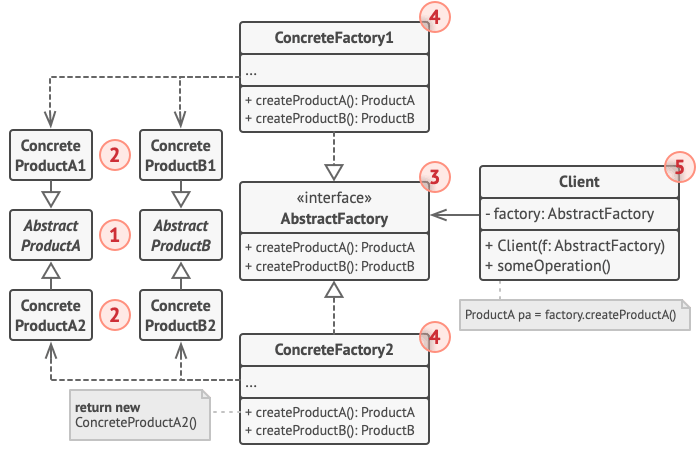
🧭Purpose:
Provides an interface for creating objects, where each specific subclass decides which exact implementations to use.
⚙When to use:
- UI libraries and frameworks
For example, Swing, Qt, JavaFX — choose appropriate component implementations for the platform. - Databases / ORM
Hibernate or Spring Data create factories to connect to different database types (PostgreSQL, Oracle, etc.). - Game engines
For selecting different families of objects (e.g., monsters + weapons of different races). - IoC containers and DI frameworks (Spring, Guice)
The entire concept of BeanFactory is an evolution of the Abstract Factory idea.
🎯Key advantages:
- Isolation of concrete classes from client code.
- Easy switching between “families” of objects.
- Guaranteed compatibility of objects within the same family.
⚠ Disadvantages:
If you need to add a new type of product, you’ll have to modify all factories, since each must support creating all kinds of products.
(However, adding new families is easy.)
Example:
/**
* Abstract Products
*/
// Button
public interface Button {
    void paint();
}

// Checkbox
public interface Checkbox {
    void paint();
}
/**
* Concrete Products
*/
// Windows
public class WinButton implements Button {
public void paint() {
System.out.println("Rendering a Windows-style button.");
}
}
public class WinCheckbox implements Checkbox {
public void paint() {
System.out.println("Rendering a Windows-style checkbox.");
}
}
// MacOS
public class MacButton implements Button {
public void paint() {
System.out.println("Rendering a macOS-style button.");
}
}
public class MacCheckbox implements Checkbox {
public void paint() {
System.out.println("Rendering a macOS-style checkbox.");
}
}/**
* Abstract Factory
*/
public interface GUIFactory {
Button createButton();
Checkbox createCheckbox();
}/**
* Concrete Factory
*/
public class WinFactory implements GUIFactory {
public Button createButton() {
return new WinButton();
}
public Checkbox createCheckbox() {
return new WinCheckbox();
}
}
public class MacFactory implements GUIFactory {
public Button createButton() {
return new MacButton();
}
public Checkbox createCheckbox() {
return new MacCheckbox();
}
}/**
* Client
*/
public class Application {
private final Button button;
private final Checkbox checkbox;
public Application(GUIFactory factory) {
this.button = factory.createButton();
this.checkbox = factory.createCheckbox();
}
public void render() {
button.paint();
checkbox.paint();
}
}/**
* Demo
*/
public class Demo {
public static void main(String[] args) {
GUIFactory factory;
String os = "mac";
if (os.equalsIgnoreCase("windows")) {
factory = new WinFactory();
} else {
factory = new MacFactory();
}
Application app = new Application(factory);
app.render();
}
}4) Builder
this is the case when an object is too complex to be conveniently built through a constructor. It helps create complex objects step by step, while keeping the code clean and readable.
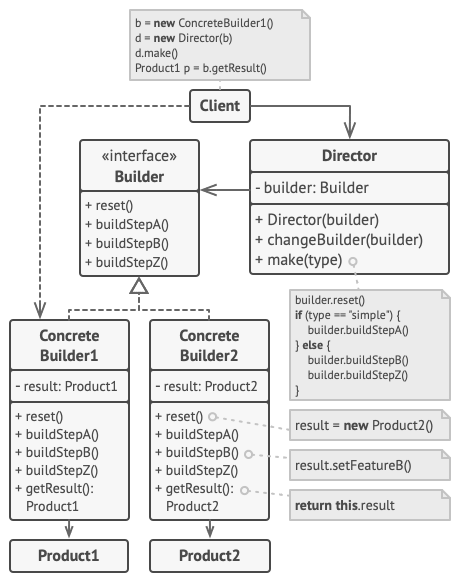
🧭Purpose:
To separate the process of constructing a complex object from its representation,
so that the same construction process can be used to create different representations.
Simply put — so you don’t have to struggle with long constructors like
new Car("V6", 4, true, "red", "automatic", true, "hybrid").
⚙When to use:
- When an object has many parameters, especially optional ones.
- When you need different combinations (configuration variants) of a complex object.
- When creation requires multiple steps (e.g., validation, dependency setup).
- When immutable state is important (the Builder creates the object once and makes it immutable).
🎯Key advantages:
- Readable code — easy to see what exactly is being set.
- Flexibility — different combinations can be created without constructor explosion.
- Immutability — the finished object is often unchangeable.
- Encapsulation of creation logic — validation or calculations can be built into the Builder.
- Extensibility — easy to add a new parameter without breaking existing code.
⚠ Disadvantages:
- More classes and code — especially if the object is simple.
- May be excessive for small models with only 1–2 parameters.
- Need to duplicate fields (in both the class and the Builder).
Example. Option A:
/**
* Product
*/
public class Car {
    private final String engine;
    private final int doors;
    private final String color;
    private final boolean hybrid;

    private Car(Builder builder) {
        this.engine = builder.engine;
        this.doors = builder.doors;
        this.color = builder.color;
        this.hybrid = builder.hybrid;
    }

    public static class Builder {
        private String engine;
        private int doors;
        private String color;
        private boolean hybrid;

        public Builder engine(String engine) {
            this.engine = engine;
            return this;
        }

        public Builder doors(int doors) {
            this.doors = doors;
            return this;
        }

        public Builder color(String color) {
            this.color = color;
            return this;
        }

        public Builder hybrid(boolean hybrid) {
            this.hybrid = hybrid;
            return this;
        }

        public Car build() {
            return new Car(this);
        }
    }

    @Override
    public String toString() {
        return "Car{" +
                "engine='" + engine + '\'' +
                ", doors=" + doors +
                ", color='" + color + '\'' +
                ", hybrid=" + hybrid +
                '}';
    }
}
/**
* Demo
*/
public class Demo {
public static void main(String[] args) {
Car car = new Car.Builder()
.engine("V8")
.doors(2)
.color("black")
.hybrid(false)
.build();
System.out.println(car);
}
}Example. Option B:
/**
* Product
*/
public class House {
    private String foundation;
    private String structure;
    private String roof;
    private int rooms;
    private boolean garage;
    private boolean garden;
    private boolean pool;

    void setFoundation(String foundation) { this.foundation = foundation; }
    void setStructure(String structure)   { this.structure = structure; }
    void setRoof(String roof)             { this.roof = roof; }
    void setRooms(int rooms)              { this.rooms = rooms; }
    void setGarage(boolean garage)        { this.garage = garage; }
    void setGarden(boolean garden)        { this.garden = garden; }
    void setPool(boolean pool)            { this.pool = pool; }

    @Override
    public String toString() {
        return "House{" +
                "foundation='" + foundation + '\'' +
                ", structure='" + structure + '\'' +
                ", roof='" + roof + '\'' +
                ", rooms=" + rooms +
                ", garage=" + garage +
                ", garden=" + garden +
                ", pool=" + pool +
                '}';
    }
}
/**
* Builder Interface
*/
public interface HouseBuilder {
void reset();
void buildFoundation();
void buildStructure();
void buildRoof();
void buildRooms(int count);
// опции
void addGarage();
void addGarden();
void addPool();
House getResult();
}/**
* Concrete Builder
*/
public class WoodenHouseBuilder implements HouseBuilder {
private House house;
public WoodenHouseBuilder() {
reset();
}
@Override
public void reset() {
house = new House();
}
@Override
public void buildFoundation() {
house.setFoundation("Wooden piles with concrete anchors");
}
@Override
public void buildStructure() {
house.setStructure("Timber frame (glued laminated wood)");
}
@Override
public void buildRoof() {
house.setRoof("Asphalt shingles on wooden rafters");
}
@Override
public void buildRooms(int count) {
if (count <= 0) throw new IllegalArgumentException("Rooms must be > 0");
house.setRooms(count);
}
@Override
public void addGarage() {
house.setGarage(true);
}
@Override
public void addGarden() {
house.setGarden(true);
}
@Override
public void addPool() {
house.setPool(true);
}
@Override
public House getResult() {
House result = house;
reset();
return result;
}
}/**
* Concrete Builder
*/
public class StoneHouseBuilder implements HouseBuilder {
private House house;
public StoneHouseBuilder() {
reset();
}
@Override
public void reset() {
house = new House();
}
@Override
public void buildFoundation() {
house.setFoundation("Monolithic concrete slab");
}
@Override
public void buildStructure() {
house.setStructure("Reinforced concrete + brick walls");
}
@Override
public void buildRoof() {
house.setRoof("Clay tiles on steel trusses");
}
@Override
public void buildRooms(int count) {
if (count <= 0) throw new IllegalArgumentException("Rooms must be > 0");
house.setRooms(count);
}
@Override
public void addGarage() {
house.setGarage(true);
}
@Override
public void addGarden() {
house.setGarden(true);
}
@Override
public void addPool() {
house.setPool(true);
}
@Override
public House getResult() {
House result = house;
reset();
return result;
}
}/**
* Director
*/
public class Director {
private HouseBuilder builder;
public Director(HouseBuilder builder) {
this.builder = builder;
}
public void setBuilder(HouseBuilder builder) {
this.builder = builder;
}
public House constructBasic() {
builder.reset();
builder.buildFoundation();
builder.buildStructure();
builder.buildRoof();
builder.buildRooms(2);
return builder.getResult();
}
public House constructFamily() {
builder.reset();
builder.buildFoundation();
builder.buildStructure();
builder.buildRoof();
builder.buildRooms(4);
builder.addGarden();
builder.addGarage();
return builder.getResult();
}
public House constructLuxury() {
builder.reset();
builder.buildFoundation();
builder.buildStructure();
builder.buildRoof();
builder.buildRooms(6);
builder.addGarage();
builder.addGarden();
builder.addPool();
return builder.getResult();
}
}/**
* Demo
*/
public class Demo {
public static void main(String[] args) {
Director director = new Director(new WoodenHouseBuilder());
House woodBasic = director.constructBasic();
House woodFamily = director.constructFamily();
House woodLuxury = director.constructLuxury();
System.out.println("[WOOD] basic -> " + woodBasic);
System.out.println("[WOOD] family -> " + woodFamily);
System.out.println("[WOOD] luxury -> " + woodLuxury);
director.setBuilder(new StoneHouseBuilder());
House stoneBasic = director.constructBasic();
House stoneFamily = director.constructFamily();
House stoneLuxury = director.constructLuxury();
System.out.println("[STONE] basic -> " + stoneBasic);
System.out.println("[STONE] family -> " + stoneFamily);
System.out.println("[STONE] luxury -> " + stoneLuxury);
HouseBuilder custom = new StoneHouseBuilder();
custom.reset();
custom.buildFoundation();
custom.buildStructure();
custom.buildRoof();
custom.buildRooms(3);
custom.addGarage();
House tailorMade = custom.getResult();
System.out.println("[CUSTOM] stone(3r + garage) -> " + tailorMade);
}
}5) Prototype
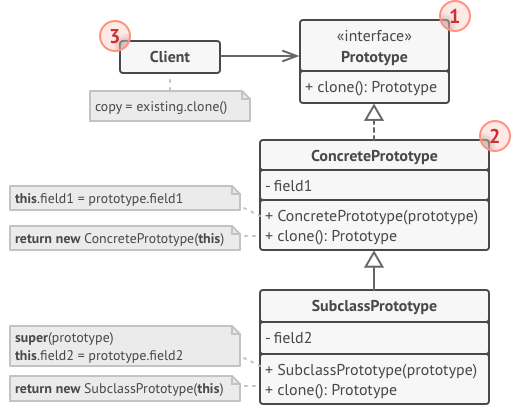
Open: Pasted image 20251006153818.png
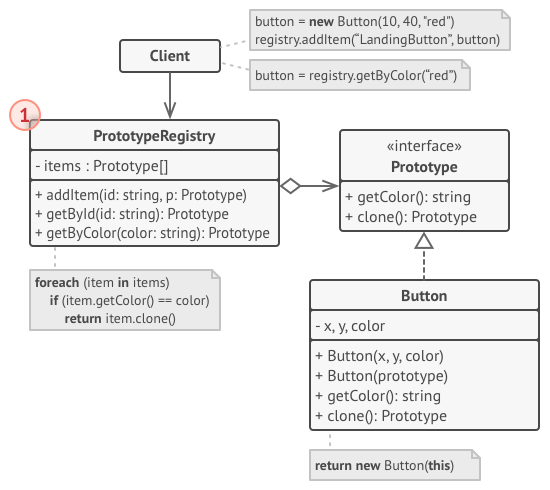
Open: Pasted image 20251006154457.png
🧭Purpose:
Allows creating new objects by cloning existing instances (prototypes) without depending on their concrete classes.
⚙When to use:
- When creating an object with
newis too expensive (e.g., it requires loading data from a database or initializing resources). - When you need many similar objects with the same basic structure.
- When the system should be independent of concrete classes of created objects (working through the
clone()interface).
🎯Key advantages:
- Performance – Faster than using constructors if the object is complex.
- Decoupling from concrete classes – The client doesn’t need to know what exactly it’s copying.
- Flexibility – Variations of objects can be easily created by modifying parameters after cloning.
- Simplifies dynamic creation – You can maintain a “prototype registry” and clone the required variant on the fly.
⚠ Disadvantages:
- Copying complexity – If an object contains nested objects, you need to perform a deep copy; otherwise, the copies will share references.
- Fragility with inheritance – Each subclass must correctly override
clone(), which is easy to get wrong. - Non-obvious behavior – Beginners may get confused by shallow vs deep cloning.
- Difficult to maintain – When adding new fields, you must remember to include them in the copy constructor or cloning logic.
Example:
/**
* Product (abstract prototype)
*/
public abstract class Shape implements Cloneable {
    private String color;

    public Shape(String color) {
        this.color = color;
    }

    public Shape(Shape target) {
        if (target != null) {
            this.color = target.color;
        }
    }

    public abstract Shape clone();

    public String getColor() {
        return color;
    }

    public void setColor(String color) {
        this.color = color;
    }
}
/**
* Concrete prototype
*/
public class Circle extends Shape {
private int radius;
public Circle(String color, int radius) {
super(color);
this.radius = radius;
}
public Circle(Circle target) {
super(target);
if (target != null) {
this.radius = target.radius;
}
}
@Override
public Shape clone() {
return new Circle(this);
}
@Override
public String toString() {
return "Circle{" +
"color='" + getColor() + '\'' +
", radius=" + radius +
'}';
}
}/**
* Concrete prototype
*/
public class Rectangle extends Shape {
private int width;
private int height;
public Rectangle(String color, int width, int height) {
super(color);
this.width = width;
this.height = height;
}
public Rectangle(Rectangle target) {
super(target);
if (target != null) {
this.width = target.width;
this.height = target.height;
}
}
@Override
public Shape clone() {
return new Rectangle(this);
}
@Override
public String toString() {
return "Rectangle{" +
"color='" + getColor() + '\'' +
", width=" + width +
", height=" + height +
'}';
}
}/**
* Demo
*/
import java.util.HashMap;
import java.util.Map;
public class Demo {
public static void main(String[] args) {
// Ptototypes
Circle prototypeCircle = new Circle("red", 10);
Rectangle prototypeRect = new Rectangle("blue", 20, 30);
Map<String, Shape> prototypes = new HashMap<>();
prototypes.put("smallCircle", prototypeCircle);
prototypes.put("rect", prototypeRect);
Circle clonedCircle = (Circle) prototypes.get("smallCircle").clone();
clonedCircle.setColor("green");
Rectangle clonedRect = (Rectangle) prototypes.get("rect").clone();
System.out.println("Original circle: " + prototypeCircle);
System.out.println("Cloned circle: " + clonedCircle);
System.out.println("Original rect: " + prototypeRect);
System.out.println("Cloned rect: " + clonedRect);
}
}Summary:
Original circle: Circle{color='red', radius=10}
Cloned circle:   Circle{color='green', radius=10}
Original rect:   Rectangle{color='blue', width=20, height=30}
Cloned rect:     Rectangle{color='blue', width=20, height=30}
🧩Structural
1) Adapter
Open: Pasted image 20251006213846.png
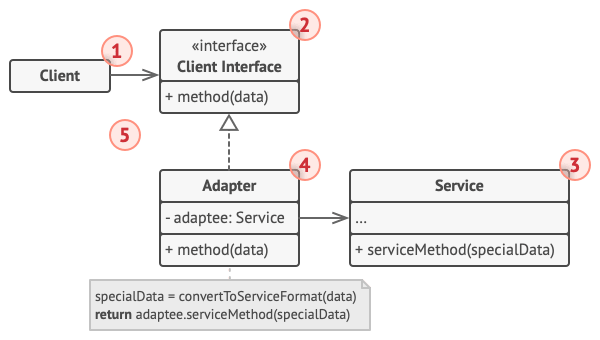
🧭Purpose:
To convert the interface of one class into an interface expected by another.
The Adapter makes incompatible classes compatible, allowing them to work together.
⚙When to use:
- When you need to integrate legacy code into a new system.
- When a library or external API has an interface that cannot be modified.
- When two classes perform similar tasks but have different methods or signatures.
- When you need to replace an interface without rewriting existing code.
🎯Key advantages:
- Compatibility without changing existing code
You can use old classes in a new architecture. - Encapsulation of differences
The client code doesn’t need to know it’s working through an adapter. - Improved reusability
Enables integration of libraries, APIs, or devices with different interfaces. - Architectural clarity
The adaptation logic is centralized instead of scattered throughout the codebase.
⚠ Disadvantages:
- Increased complexity
Adds an extra layer of abstraction (another class). - Potential performance overhead
Especially with multiple layers of adaptation (e.g., nested adapters). - May treat symptoms, not causes
If interfaces are too different, the adapter becomes a “patch” rather than a true solution.
Example
/**
* Old interface (Target)
*/
public interface SDCard {
    String readSD();
}
/**
* Implement old interface
*/
public class SDCardImpl implements SDCard {
@Override
public String readSD() {
return "Reading data from SD card...";
}
}/**
* New interface
*/
public interface USBDevice {
String readUSB();
}/**
* Implement new interface
*/
public class USBReader implements USBDevice {
@Override
public String readUSB() {
return "Reading data from USB device...";
}
}/**
* Adapter
*/
public class SDToUSBAdapter implements USBDevice {
private final SDCard sdCard;
public SDToUSBAdapter(SDCard sdCard) {
this.sdCard = sdCard;
}
@Override
public String readUSB() {
return sdCard.readSD();
}
}/**
* Client code
*/
public class Demo {
public static void main(String[] args) {
SDCard sdCard = new SDCardImpl();
USBDevice usbPort = new SDToUSBAdapter(sdCard);
System.out.println(usbPort.readUSB());
}
}Summary:
Reading data from SD card...
🧩Adapter variants:
- Object Adapter — via composition (as in the example: the adapter holds a reference to the adapted object).
- Class Adapter — via inheritance (implements one interface and inherits another class). Used when the language supports multiple inheritance (rarely used in Java).
- Bidirectional Adapter — adapts both directions (commonly seen when integrating an old API with a new one).
2) Facade
Open: Pasted image 20251006222107.png
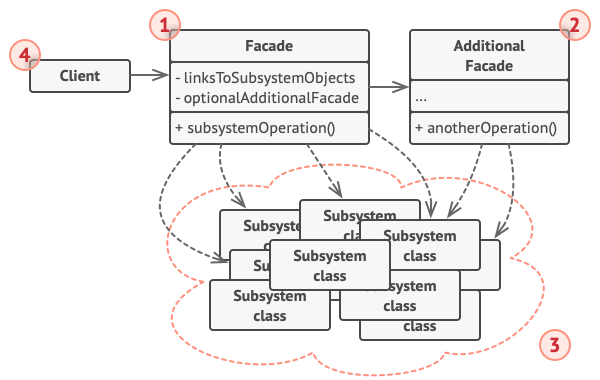
🧭Purpose:
To provide a unified, simple interface to a complex subsystem. The Facade defines a higher-level interface that makes the system easier to use.
In simple terms: instead of calling three different departments, you call one call center (the Facade), and it figures out who needs to do what.
⚙When to use:
- When a system consists of many complex classes or APIs, and you need to simplify interaction with it.
- When you want to separate system layers (the client shouldn’t know implementation details).
- When you need to reduce coupling between subsystems.
- When you want to create a convenient entry point into a module.
🎯Key advantages:
- Simplified interaction
The client doesn’t need to know the internal structure of the subsystem. - Reduced coupling
The client depends only on the facade, not on dozens of specific classes. - Encapsulation of complexity
All the coordination logic between components is hidden inside the facade. - Improved readability and modularity
Facades become logical “gateways” to different subsystems. - Ease of refactoring
Internal classes can be changed without affecting client code.
⚠ Disadvantages:
- Risk of over-reliance on the facade
If clients use only the facade, they may lose flexibility when they need low-level control. - Limited functionality
Sometimes the facade doesn’t expose all subsystem features. - May hide architectural problems
If a subsystem is too tangled, a facade might only “mask” the complexity rather than solve the root issue.
Example:
/**
* Subsystem (inner classes)
*/
public class DVDPlayer {
    public void on() { System.out.println("DVD Player ON"); }
    public void play(String movie) { System.out.println("Playing movie: " + movie); }
    public void off() { System.out.println("DVD Player OFF"); }
}

public class Projector {
    public void on() { System.out.println("Projector ON"); }
    public void wideScreenMode() { System.out.println("Projector in widescreen mode"); }
    public void off() { System.out.println("Projector OFF"); }
}

public class Amplifier {
    public void on() { System.out.println("Amplifier ON"); }
    public void setVolume(int level) { System.out.println("Volume set to " + level); }
    public void off() { System.out.println("Amplifier OFF"); }
}

public class Lights {
    public void dim(int level) { System.out.println("Lights dimmed to " + level + "%"); }
    public void on() { System.out.println("Lights ON"); }
}
/**
* Facade (simplified interface)
*/
public class HomeTheaterFacade {
private final DVDPlayer dvd;
private final Projector projector;
private final Amplifier amp;
private final Lights lights;
public HomeTheaterFacade(DVDPlayer dvd, Projector projector, Amplifier amp, Lights lights) {
this.dvd = dvd;
this.projector = projector;
this.amp = amp;
this.lights = lights;
}
public void watchMovie(String movie) {
System.out.println("Getting ready to watch a movie...");
lights.dim(20);
projector.on();
projector.wideScreenMode();
amp.on();
amp.setVolume(8);
dvd.on();
dvd.play(movie);
}
public void endMovie() {
System.out.println("Shutting movie theater down...");
dvd.off();
amp.off();
projector.off();
lights.on();
}
}/**
* Client
*/
public class Demo {
public static void main(String[] args) {
DVDPlayer dvd = new DVDPlayer();
Projector projector = new Projector();
Amplifier amp = new Amplifier();
Lights lights = new Lights();
HomeTheaterFacade homeTheater = new HomeTheaterFacade(dvd, projector, amp, lights);
homeTheater.watchMovie("Inception");
System.out.println();
homeTheater.endMovie();
}
}Summary:
Getting ready to watch a movie...
Lights dimmed to 20%
Projector ON
Projector in widescreen mode
Amplifier ON
Volume set to 8
DVD Player ON
Playing movie: Inception

Shutting movie theater down...
DVD Player OFF
Amplifier OFF
Projector OFF
Lights ON
3) Proxy
Open: Pasted image 20251006223122.png
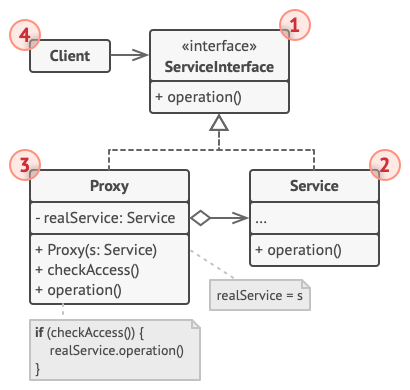
🧭Purpose:
Allows substituting a real object with its “representative,” which controls access to it. A proxy has the same interface as the real object and intercepts calls to it.
Simply put: instead of speaking directly to the “king” (the real object), you talk to his “advisor” (the Proxy),
who decides whether the king needs to be disturbed or can respond on his behalf.
⚙When to use:
- When you need to control access to a resource (e.g., security, authentication).
- When you need to delay creation of an expensive object (lazy initialization).
- When you need to perform remote calls (Remote Proxy).
- When you need to cache results (Caching Proxy).
- When you need to log, validate, or synchronize calls (Smart Proxy).
🎯Key advantages:
- Access control
Calls to the real object can be filtered or restricted. - Lazy initialization
Expensive objects (files, connections, large collections) are created only when needed. - Caching
Stores results of previous calls for reuse. - Security and logging
Enables authentication, monitoring, and logging. - Network communication
The proxy can represent a remote object (Remote Proxy — e.g., RMI, REST).
⚠ Disadvantages:
- Code complexity
Adds an additional layer between the client and the object. - Synchronization difficulty
If the real object changes its state, data must be carefully synchronized between Proxy and Real. - Potential delays
If the proxy performs extra checks or network calls, it may slow down execution. - Hidden logic
Since the interface is identical, it may be unclear that the object is actually a “stand-in.”
🧩Types of Proxy
| Type | Purpose |
|---|---|
| Virtual Proxy | Delays creation of “heavy” objects (example above). |
| Protection Proxy | Controls access rights (e.g., user role verification). |
| Remote Proxy | Represents an object located on another server (e.g., RMI, gRPC, REST). |
| Smart Proxy | Adds functionality on every access (logging, reference counting, transactions). |
| Caching Proxy | Stores results for reuse (e.g., when working with APIs). |
Example:
/**
* Interface
*/
public interface Image {
    void display();
}
/**
* Real object (the one that loads the image)
*/
public class RealImage implements Image {
private final String filename;
public RealImage(String filename) {
this.filename = filename;
loadFromDisk();
}
private void loadFromDisk() {
System.out.println("Loading image from disk: " + filename);
try { Thread.sleep(1000); } catch (InterruptedException ignored) {} // simulation of a long loading process
}
@Override
public void display() {
System.out.println("Displaying image: " + filename);
}
}/**
* Proxy (substitute)
*/
public class ProxyImage implements Image {
private RealImage realImage;
private final String filename;
public ProxyImage(String filename) {
this.filename = filename;
}
@Override
public void display() {
// Lazy initialization — create RealImage only on the first call
if (realImage == null) {
realImage = new RealImage(filename);
} else {
System.out.println("Image already loaded — using cached instance");
}
realImage.display();
}
}/**
* Cleint
*/
public class Demo {
public static void main(String[] args) {
Image img = new ProxyImage("photo.jpg");
// first access — loads from disk
img.display();
System.out.println();
// second access — no loading
img.display();
}
}Summary:
Loading image from disk: photo.jpg
Displaying image: photo.jpg

Image already loaded — using cached instance
Displaying image: photo.jpg
4) Decorator
Open: Pasted image 20251006224325.png
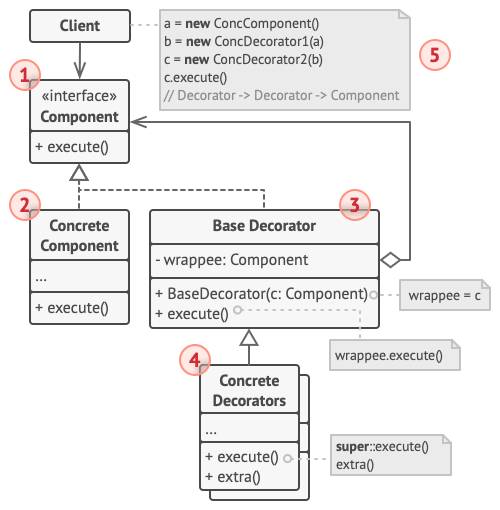
🧭Purpose:
Dynamically extends the behavior of an object without modifying its original class. Allows flexible composition of functionality through nested wrappers.
Metaphorically: you take a cup of coffee (the base object), add milk — that’s one decorator, top it with whipped cream — another decorator. And it’s still coffee, just “with extras.”
⚙When to use:
- When you need to add functionality to an object on the fly, without altering its class.
- When inheritance can’t be used (e.g., the class is final or fixed).
- When you need to combine different behaviors flexibly.
- When you want to replace rigid inheritance hierarchies with lightweight composition.
🎯Key advantages:
- Dynamic behavior extension
You can “add” or “remove” decorators at runtime. - Avoids deep inheritance trees
No need to create subclasses likeCoffeeWithMilkAndSugarAndWhip. - Flexible feature combination
Any number of decorators can be stacked in any order. - Follows the Open/Closed Principle (OCP)
Base class code remains unchanged when new functionality is added.
⚠ Disadvantages:
- More complex structure
Many small classes — each “add-on” requires its own decorator. - Harder debugging
With deep nesting, it’s difficult to trace which layer is currently active. - Configuration overhead
Objects must be wrapped manually (unless you use DI or a Builder).
Example:
/**
* Component (basis inteface)
*/
public interface Coffee {
    String getDescription();
    double getCost();
}
/**
* Concrete component (basis drink)
*/
public class SimpleCoffee implements Coffee {
@Override
public String getDescription() {
return "Simple coffee";
}
@Override
public double getCost() {
return 2.0;
}
}/**
* Abstract decorator
*/
public abstract class CoffeeDecorator implements Coffee {
protected final Coffee decoratedCoffee;
protected CoffeeDecorator(Coffee decoratedCoffee) {
this.decoratedCoffee = decoratedCoffee;
}
@Override
public String getDescription() {
return decoratedCoffee.getDescription();
}
@Override
public double getCost() {
return decoratedCoffee.getCost();
}
}/**
* Concrete decorator
*/
public class MilkDecorator extends CoffeeDecorator {
public MilkDecorator(Coffee coffee) {
super(coffee);
}
@Override
public String getDescription() {
return decoratedCoffee.getDescription() + ", milk";
}
@Override
public double getCost() {
return decoratedCoffee.getCost() + 0.5;
}
}/**
* Concrete decorator
*/
public class SugarDecorator extends CoffeeDecorator {
public SugarDecorator(Coffee coffee) {
super(coffee);
}
@Override
public String getDescription() {
return decoratedCoffee.getDescription() + ", sugar";
}
@Override
public double getCost() {
return decoratedCoffee.getCost() + 0.2;
}
}/**
* Concrete decorator
*/
public class WhipDecorator extends CoffeeDecorator {
public WhipDecorator(Coffee coffee) {
super(coffee);
}
@Override
public String getDescription() {
return decoratedCoffee.getDescription() + ", whipped cream";
}
@Override
public double getCost() {
return decoratedCoffee.getCost() + 0.7;
}
}/**
* Client
*/
public class Demo {
public static void main(String[] args) {
Coffee coffee = new SimpleCoffee();
System.out.println(coffee.getDescription() + " -> $" + coffee.getCost());
coffee = new MilkDecorator(coffee);
coffee = new SugarDecorator(coffee);
coffee = new WhipDecorator(coffee);
System.out.println(coffee.getDescription() + " -> $" + coffee.getCost());
}
}Summary:
Simple coffee -> $2.0
Simple coffee, milk, sugar, whipped cream -> $3.4
5) Bridge
Open: Pasted image 20251006225249.png
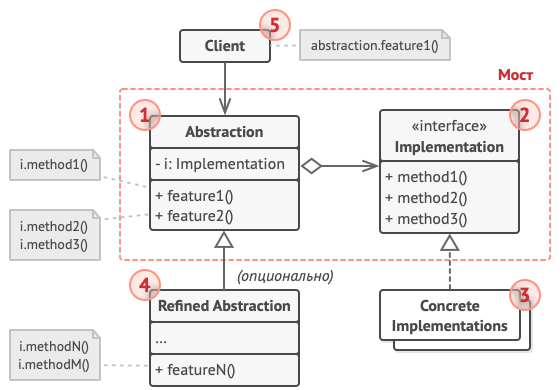
🧭Purpose:
To separate an abstraction (the interface visible to the client) from its implementation (internal details) so that they can evolve independently.
Metaphorically speaking: the abstraction is the remote control, the implementation is the TV.
Remotes can differ (universal, voice-controlled, touchpad), and TVs can differ (Samsung, LG, Sony) — yet you can use any remote with any TV as long as there’s a common “bridge.”
⚙When to use:
- When you need to avoid subclass explosion, for example:
CircleRed,CircleBlue,SquareRed,SquareBlue→ everything gets duplicated.
With Bridge, you can separate the shape (abstraction) from the color (implementation). - When the abstraction and implementation should develop independently.
- When you need to switch implementations at runtime.
- When you want to reduce coupling between system layers.
🎯Key advantages:
- Independence of abstraction and implementation
You can add new shapes and new rendering methods independently. - Flexibility
You can change the implementation at runtime (for example, switch to a different API). - Reduced code duplication
No need to create class combinations for each “shape + API” pair. - Follows SRP and OCP principles
Each layer has a single responsibility, and new features don’t break existing code.
⚠ Disadvantages:
- More complex structure
Requires more classes and interfaces than simple inheritance. - Higher abstraction level
For beginners, the code may seem overly complex without experience. - Unnecessary for small systems
If there’s no real need to separate implementation, Bridge may be overkill.
Example:
/**
* Implementor
*/
public interface DrawingAPI {
    void drawCircle(double x, double y, double radius);
}
/**
* Concrete implementatin
*/
public class OpenGLAPI implements DrawingAPI {
@Override
public void drawCircle(double x, double y, double radius) {
System.out.println("Drawing circle with OpenGL at (" + x + ", " + y + ") radius " + radius);
}
}
public class DirectXAPI implements DrawingAPI {
@Override
public void drawCircle(double x, double y, double radius) {
System.out.println("Drawing circle with DirectX at (" + x + ", " + y + ") radius " + radius);
}
}/**
* Abstraction
*/
public abstract class Shape {
protected DrawingAPI drawingAPI;
protected Shape(DrawingAPI drawingAPI) {
this.drawingAPI = drawingAPI;
}
public abstract void draw();
public abstract void resize(double factor);
}/**
* Concrete abstraction
*/
public class Circle extends Shape {
private double x, y, radius;
public Circle(double x, double y, double radius, DrawingAPI drawingAPI) {
super(drawingAPI);
this.x = x;
this.y = y;
this.radius = radius;
}
@Override
public void draw() {
drawingAPI.drawCircle(x, y, radius);
}
@Override
public void resize(double factor) {
radius *= factor;
}
}/**
* Client
*/
public class Demo {
public static void main(String[] args) {
Shape circleOpenGL = new Circle(10, 20, 5, new OpenGLAPI());
Shape circleDirectX = new Circle(15, 25, 7, new DirectXAPI());
circleOpenGL.draw();
circleDirectX.draw();
circleOpenGL.resize(2);
circleOpenGL.draw();
}
}
Summary:
Drawing circle with OpenGL at (10.0, 20.0) radius 5.0
Drawing circle with DirectX at (15.0, 25.0) radius 7.0
Drawing circle with OpenGL at (10.0, 20.0) radius 10.0
6) Composite
Open: Pasted image 20251006230305.png
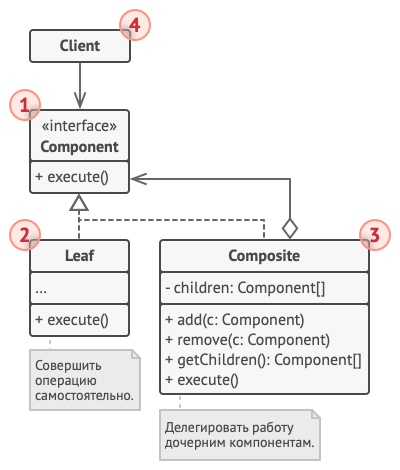
🧭Purpose:
To combine objects into a tree structure and allow treating individual objects and their compositions uniformly.
Metaphorically: think of folders and files. A file is a “leaf,” a folder is a “composite” that can contain other files and folders.
Both files and folders share a common interface — for example, getSize().
⚙When to use:
- When you need to represent hierarchical structures (trees, menus, organizational charts).
- When the client shouldn’t care whether it’s working with a single object or a group of objects.
- When you want to simplify the code so you don’t have to check the object type before each action.
🎯Key advantages:
- Unified interface across all levels
The client doesn’t care whether it’s dealing with a leaf or a branch. - Recursive structures
You can build trees of any depth. - Easy addition of new elements
New types of leaves and nodes are easily added as long as they implement the common interface. - Clean and extensible code
No need forif (obj instanceof Folder)— you just call the method.
⚠ Disadvantages:
- Complex parent-child management
If you need to know who’s the “parent” of whom, extra logic is required. - Harder to restrict access
It’s difficult to forbid adding certain types of objects since the interface is shared. - Potential behavior duplication
Some methods may not make sense for leaves (e.g.,add()in a file).
Example:
/**
* Component (common interface)
*/
public interface FileSystemComponent {
    void showDetails();
    int getSize();
}
/**
* List (file)
*/
public class FileLeaf implements FileSystemComponent {
private final String name;
private final int size;
public FileLeaf(String name, int size) {
this.name = name;
this.size = size;
}
@Override
public void showDetails() {
System.out.println("File: " + name + " (" + size + "KB)");
}
@Override
public int getSize() {
return size;
}
}/**
* Composit (folder)
*/
import java.util.ArrayList;
import java.util.List;
public class DirectoryComposite implements FileSystemComponent {
private final String name;
private final List<FileSystemComponent> components = new ArrayList<>();
public DirectoryComposite(String name) {
this.name = name;
}
public void add(FileSystemComponent component) {
components.add(component);
}
public void remove(FileSystemComponent component) {
components.remove(component);
}
@Override
public void showDetails() {
System.out.println("Directory: " + name);
for (FileSystemComponent component : components) {
component.showDetails();
}
}
@Override
public int getSize() {
int total = 0;
for (FileSystemComponent component : components) {
total += component.getSize();
}
return total;
}
}/**
* Client
*/
public class Demo {
public static void main(String[] args) {
// файлы
FileSystemComponent file1 = new FileLeaf("notes.txt", 12);
FileSystemComponent file2 = new FileLeaf("photo.jpg", 340);
FileSystemComponent file3 = new FileLeaf("video.mp4", 2048);
// Folder "Documents"
DirectoryComposite docs = new DirectoryComposite("Documents");
docs.add(file1);
docs.add(file2);
// Folder "Video"
DirectoryComposite videos = new DirectoryComposite("Videos");
videos.add(file3);
// Main folder
DirectoryComposite root = new DirectoryComposite("Root");
root.add(docs);
root.add(videos);
// View
root.showDetails();
System.out.println("\nTotal size: " + root.getSize() + "KB");
}
}Summary:
Directory: Root
Directory: Documents
File: notes.txt (12KB)
File: photo.jpg (340KB)
Directory: Videos
File: video.mp4 (2048KB)

Total size: 2400KB
🧱Behavioral
1) Observer
Open: Pasted image 20251006231132.png
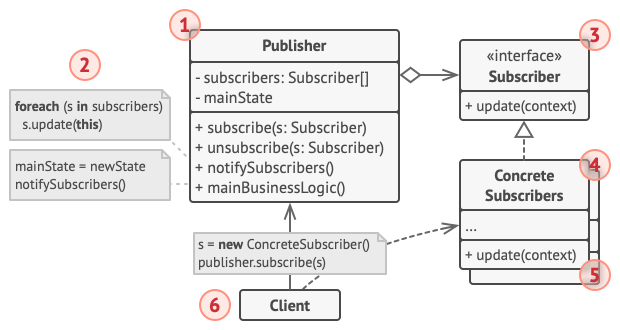
🧭Purpose:
To define a one-to-many dependency between objects so that when one object changes state, all its dependents are automatically notified and updated.
Metaphorically: it’s like a YouTube channel and its subscribers — when the channel posts a new video (an event), all subscribers get a notification without constantly asking, “Has something new come out yet?”
⚙When to use:
- When a single change should automatically notify multiple other objects.
- When objects should remain loosely coupled, and the publisher shouldn’t know who’s subscribed.
- When you need to synchronize states of several components (for example, UI and data model).
- When implementing reactive or event-driven behavior.
🎯Key advantages:
- Loose coupling
The publisher doesn’t know who’s subscribed — observers can be added, removed, or changed without modifying the publisher’s code. - Automatic synchronization
All subscribers receive up-to-date information without manual polling. - Extensibility
New observers with different behaviors can be easily added. - Supports the OCP principle — new listeners can be introduced without changing the subject’s logic.
⚠ Disadvantages:
- Hard to debug
Hidden connections make it difficult to track who is notifying whom. - Notification order
May be unpredictable when there are many observers. - Performance issues
With a large number of subscribers, notifications can become expensive. - Potential observer leaks
If listeners aren’t removed properly, references may keep objects in memory.
Example:
/**
* Interface Observer
*/
public interface Observer {
    void update(float temperature, float humidity);
}
/**
* Interface Subject
*/
public interface Subject {
void registerObserver(Observer observer);
void removeObserver(Observer observer);
void notifyObservers();
}/**
* Concrete Subject
*/
import java.util.ArrayList;
import java.util.List;
public class WeatherStation implements Subject {
private final List<Observer> observers = new ArrayList<>();
private float temperature;
private float humidity;
@Override
public void registerObserver(Observer observer) {
observers.add(observer);
}
@Override
public void removeObserver(Observer observer) {
observers.remove(observer);
}
@Override
public void notifyObservers() {
for (Observer observer : observers) {
observer.update(temperature, humidity);
}
}
public void setMeasurements(float temperature, float humidity) {
this.temperature = temperature;
this.humidity = humidity;
notifyObservers();
}
}/**
* Concrete observers
*/
public class PhoneDisplay implements Observer {
@Override
public void update(float temperature, float humidity) {
System.out.println("📱 Phone Display -> Temp: " + temperature + "°C, Humidity: " + humidity + "%");
}
}
public class WebDisplay implements Observer {
@Override
public void update(float temperature, float humidity) {
System.out.println("🌐 Web Dashboard -> Temp: " + temperature + "°C, Humidity: " + humidity + "%");
}
}/**
* Cleint
*/
public class Demo {
public static void main(String[] args) {
WeatherStation station = new WeatherStation();
Observer phone = new PhoneDisplay();
Observer web = new WebDisplay();
station.registerObserver(phone);
station.registerObserver(web);
station.setMeasurements(22.5f, 65f);
station.setMeasurements(25.0f, 70f);
}
}Summary:
📱 Phone Display -> Temp: 22.5°C, Humidity: 65.0%
🌐 Web Dashboard -> Temp: 22.5°C, Humidity: 65.0%
📱 Phone Display -> Temp: 25.0°C, Humidity: 70.0%
🌐 Web Dashboard -> Temp: 25.0°C, Humidity: 70.0%
2) Command
Open: Pasted image 20251006231351.png
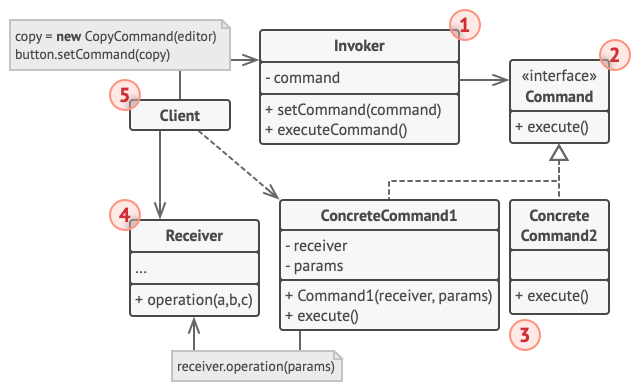
🧭Purpose:
To encapsulate a request (an action) as an object, allowing you to parameterize clients with different requests, queue them, undo or redo their execution.
Metaphorically: the waiter (Invoker) takes an order (Command) and passes it to the kitchen (Receiver). The waiter doesn’t cook — he simply knows what needs to be done and who should do it.
⚙When to use:
- When you need to decouple the sender of a command from its receiver, so they don’t know about each other directly.
- When undo/redo functionality is required.
- When you want to queue operations or build macro commands (sequences of actions).
- When actions should be logged or replayed.
- When you need to centrally manage commands (for example, UI buttons).
🎯Key advantages:
- Decouples sender from receiver
Objects don’t depend on each other directly. - Supports undo and redo
Each command knows how to undo itself. - Supports queues and macro commands
Multiple commands can be executed in sequence. - Easy logging and auditing
Commands can be stored for later analysis or replay. - Extensibility
New commands can be added without modifying existing code (OCP).
⚠ Disadvantages:
- Many small classes
Each operation requires its own class. - Increased architectural complexity
Simple actions may become overly wrapped. - Additional memory and time overhead
Especially when storing commands for undo/redo.
Example:
/**
* Command interface
*/
public interface Command {
    void execute();
    void undo();
}
/**
* Receivers
*/
public class Light {
private final String location;
public Light(String location) {
this.location = location;
}
public void on() {
System.out.println(location + " light is ON");
}
public void off() {
System.out.println(location + " light is OFF");
}
}
public class Stereo {
private final String location;
public Stereo(String location) {
this.location = location;
}
public void on() {
System.out.println(location + " stereo is ON");
}
public void off() {
System.out.println(location + " stereo is OFF");
}
}/**
* Concrete commands
*/
public class LightOnCommand implements Command {
private final Light light;
public LightOnCommand(Light light) {
this.light = light;
}
@Override
public void execute() {
light.on();
}
@Override
public void undo() {
light.off();
}
}
public class LightOffCommand implements Command {
private final Light light;
public LightOffCommand(Light light) {
this.light = light;
}
@Override
public void execute() {
light.off();
}
@Override
public void undo() {
light.on();
}
}
public class StereoOnCommand implements Command {
private final Stereo stereo;
public StereoOnCommand(Stereo stereo) {
this.stereo = stereo;
}
@Override
public void execute() {
stereo.on();
}
@Override
public void undo() {
stereo.off();
}
}/**
* Invoker
*/
public class RemoteControl {
private Command lastCommand;
public void submit(Command command) {
command.execute();
lastCommand = command;
}
public void undo() {
if (lastCommand != null) {
System.out.println("Undoing last command...");
lastCommand.undo();
}
}
}/**
* Cleint
*/
public class Demo {
public static void main(String[] args) {
Light livingRoomLight = new Light("Living room");
Stereo stereo = new Stereo("Living room");
Command lightOn = new LightOnCommand(livingRoomLight);
Command lightOff = new LightOffCommand(livingRoomLight);
Command stereoOn = new StereoOnCommand(stereo);
RemoteControl remote = new RemoteControl();
remote.submit(lightOn);
remote.submit(stereoOn);
remote.submit(lightOff);
remote.undo();
}
}Summary:
Living room light is ON
Living room stereo is ON
Living room light is OFF
Undoing last command...
Living room light is ON
3) Strategy
Open: Pasted image 20251006234225.png
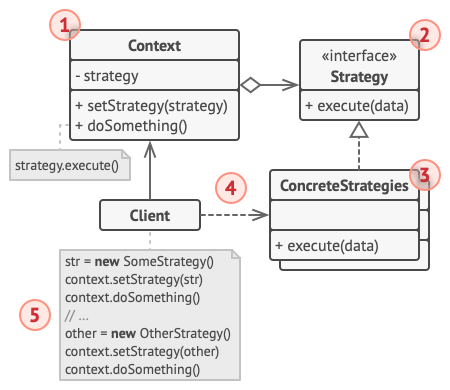
🧭Purpose:
To define a family of algorithms, encapsulate each one, and make them interchangeable.
This allows the algorithm to vary independently from the client that uses it.
Metaphorically: you have a navigation app, and you can choose to travel by car, by bike, or on foot.
The algorithms differ, but the interface is the same — “build route”.
⚙When to use:
- When you need to change an object’s behavior at runtime.
- When a class has many
if/switchstatements for different algorithm variations. - When algorithms are frequently modified or extended.
- When you want to separate logic (what the client does) from implementation details (how it’s done).
🎯Key advantages:
- Flexibility and extensibility
Adding a new algorithm doesn’t require modifying the client. - Removes conditional logic
Instead ofif/else, you simply select a strategy. - Follows SOLID principles
- OCP — new strategies can be added without altering existing code.
- SRP — each strategy performs one specific algorithm.
- Supports runtime switching
Behavior can be changed dynamically while the program is running.
⚠ Disadvantages:
- Increased number of classes
Each strategy requires its own class. - Not always justified
For simple cases, anifblock may be more straightforward. - Client awareness required
The client must know which strategy to choose and when.
Example:
/**
* Strategy interface
*/
public interface PaymentStrategy {
    void pay(int amount);
}
/**
* Concrete strategy
*/
public class CreditCardPayment implements PaymentStrategy {
private final String cardNumber;
public CreditCardPayment(String cardNumber) {
this.cardNumber = cardNumber;
}
@Override
public void pay(int amount) {
System.out.println("Paid " + amount + "€ using Credit Card (" + cardNumber + ")");
}
}
public class PayPalPayment implements PaymentStrategy {
private final String email;
public PayPalPayment(String email) {
this.email = email;
}
@Override
public void pay(int amount) {
System.out.println("Paid " + amount + "€ using PayPal (" + email + ")");
}
}
public class CashPayment implements PaymentStrategy {
@Override
public void pay(int amount) {
System.out.println("Paid " + amount + "€ in cash");
}
}/**
* Context (client)
*/
public class Order {
private PaymentStrategy paymentStrategy;
public void setPaymentStrategy(PaymentStrategy paymentStrategy) {
this.paymentStrategy = paymentStrategy;
}
public void processOrder(int amount) {
if (paymentStrategy == null) {
throw new IllegalStateException("No payment strategy set!");
}
paymentStrategy.pay(amount);
}
}/**
* Using
*/
public class Demo {
public static void main(String[] args) {
Order order = new Order();
order.setPaymentStrategy(new CreditCardPayment("1234-5678-9012"));
order.processOrder(50);
order.setPaymentStrategy(new PayPalPayment("user@example.com"));
order.processOrder(75);
order.setPaymentStrategy(new CashPayment());
order.processOrder(20);
}
}Summary:
Paid 50€ using Credit Card (1234-5678-9012)
Paid 75€ using PayPal (user@example.com)
Paid 20€ in cash
4) Iterator
Open: Pasted image 20251006234356.png
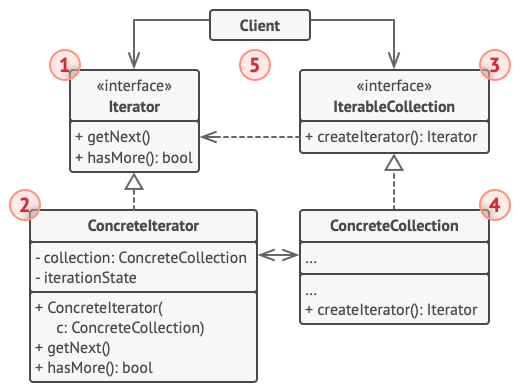
🧭Purpose:
To provide a unified interface for sequential access to the elements of a collection without exposing its internal structure (list, tree, graph, etc.).
Metaphorically: it’s like a museum guide who knows how to lead you from one painting to another without making you study the building’s layout.
⚙When to use:
- When you need to traverse complex data structures (lists, trees, graphs).
- When you want to encapsulate traversal logic so the client doesn’t need to know how elements are stored.
- When you need to support multiple traversal methods (forward, backward, breadth-first, etc.).
- When it’s important to make the collection usable with different iteration styles.
🎯Key advantages:
- Encapsulation of collection structure
The client doesn’t need to know whether data is stored as an array, list, or tree. - Universal traversal interface
Any collection can be iterated over in the same way. - Multiple simultaneous iterators
You can have several active traversals of the same collection. - Different traversal types
For example, forward, backward, or level-order traversal. - Supports SRP and OCP principles
The collection handles storage; the iterator handles traversal.
⚠ Disadvantages:
- Additional classes
Each traversal type requires its own iterator implementation. - Not always efficient
For large structures, iterator creation may add overhead. - Potential inconsistency
If the collection is modified during iteration, errors may occur (likeConcurrentModificationExceptionin Java).
Example:
/**
* Iterator interface
*/
public interface Iterator<T> {
    boolean hasNext();
    T next();
}
/**
* Collection interface
*/
public interface Container<T> {
Iterator<T> getIterator();
}/**
* Concrete collection
*/
public class NameRepository implements Container<String> {
private final String[] names = {"Alice", "Bob", "Charlie", "Diana"};
@Override
public Iterator<String> getIterator() {
return new NameIterator();
}
private class NameIterator implements Iterator<String> {
int index = 0;
@Override
public boolean hasNext() {
return index < names.length;
}
@Override
public String next() {
if (!hasNext()) {
throw new IllegalStateException("No more elements");
}
return names[index++];
}
}
}/**
* Client
*/
public class Demo {
public static void main(String[] args) {
NameRepository repository = new NameRepository();
Iterator<String> iterator = repository.getIterator();
while (iterator.hasNext()) {
System.out.println("Name: " + iterator.next());
}
}
}Summary:
Name: Alice
Name: Bob
Name: Charlie
Name: Diana
5) Visitor
Open: Pasted image 20251006234507.png
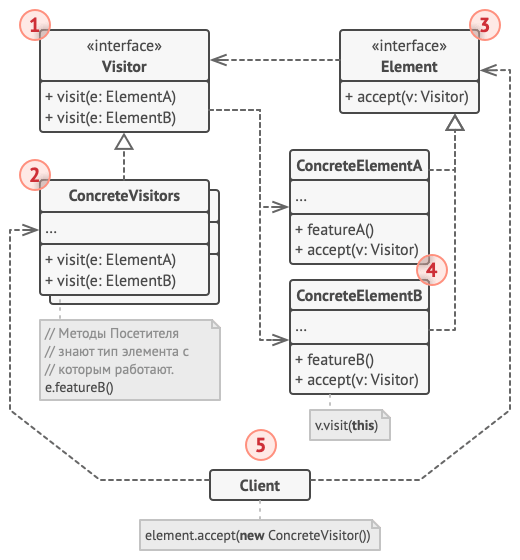
🧭Purpose:
To separate algorithms from the data structure, allowing new operations to be added without modifying the element classes.
Metaphorically: you are a museum visitor. The museum has different exhibits (paintings, sculptures, artifacts). Each exhibit accepts you (accept(visitor)), and you decide what to do with each type — take a photo, evaluate it, describe it, etc.
⚙When to use:
- When you need to perform many different operations on objects in a complex structure (e.g., a tree, AST, or file system).
- When the classes of elements change rarely, but operations on them change frequently.
- When you need to add behavior without modifying the element classes (technically violating the open/closed principle).
- When you want to separate behavior from data structure.
🎯Key advantages:
- Adds new operations without changing element classes
You simply create a newVisitor. - Separates logic from data structure
Elements define what they are, while the visitor defines what to do with them. - Unified handling of different element types
A single visitor can operate across multiple element types. - Clean code organization
All algorithms are centralized instead of scattered across classes.
⚠ Disadvantages:
- Harder to add new element types
Every visitor must be updated (violating OCP for the visitor side). - Dependency on structure
The visitor must know all element types. - Lots of code and duplication
With many types and operations, the number of methods grows quickly. - Not suitable for frequently changing structures
If element classes change often, the visitor must be rewritten.
Example:
/**
* Element interface
*/
public interface DocumentElement {
    void accept(Visitor visitor);
}
/**
* Concrete Element
*/
public class Paragraph implements DocumentElement {
private final String text;
public Paragraph(String text) {
this.text = text;
}
public String getText() {
return text;
}
@Override
public void accept(Visitor visitor) {
visitor.visit(this);
}
}
public class Image implements DocumentElement {
private final String fileName;
public Image(String fileName) {
this.fileName = fileName;
}
public String getFileName() {
return fileName;
}
@Override
public void accept(Visitor visitor) {
visitor.visit(this);
}
}/**
* Visitor Interface
*/
public interface Visitor {
void visit(Paragraph paragraph);
void visit(Image image);
}/**
* Concrete Visitor
*/
public class RenderVisitor implements Visitor {
@Override
public void visit(Paragraph paragraph) {
System.out.println("📝 Rendering text: " + paragraph.getText());
}
@Override
public void visit(Image image) {
System.out.println("🖼 Rendering image: " + image.getFileName());
}
}
public class ExportVisitor implements Visitor {
@Override
public void visit(Paragraph paragraph) {
System.out.println("📤 Exporting paragraph to PDF: " + paragraph.getText());
}
@Override
public void visit(Image image) {
System.out.println("📤 Exporting image to ZIP: " + image.getFileName());
}
}/**
* Client
*/
import java.util.List;
public class Demo {
public static void main(String[] args) {
List<DocumentElement> document = List.of(
new Paragraph("Hello, Visitor pattern!"),
new Image("diagram.png"),
new Paragraph("End of document.")
);
Visitor renderer = new RenderVisitor();
Visitor exporter = new ExportVisitor();
System.out.println("--- Rendering document ---");
document.forEach(e -> e.accept(renderer));
System.out.println("\n--- Exporting document ---");
document.forEach(e -> e.accept(exporter));
}
}Summary:
--- Rendering document ---
📝 Rendering text: Hello, Visitor pattern!
🖼 Rendering image: diagram.png
📝 Rendering text: End of document.

--- Exporting document ---
📤 Exporting paragraph to PDF: Hello, Visitor pattern!
📤 Exporting image to ZIP: diagram.png
📤 Exporting paragraph to PDF: End of document.