1. Maven
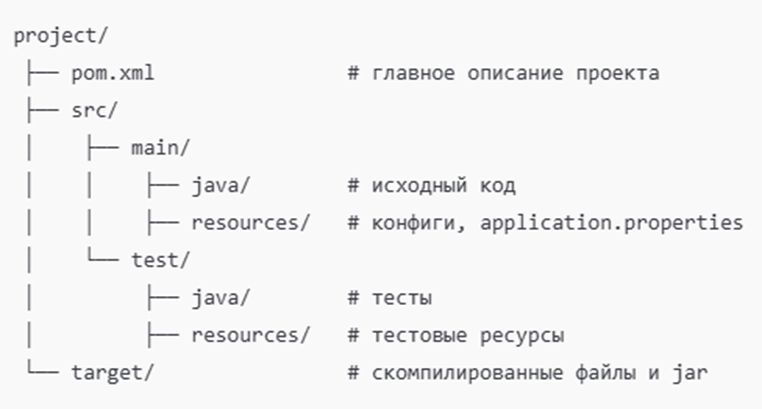
📂 Project Structure (Standard Directory Layout)
mavenstructure.jpeg
📄 Minimal pom.xml
<project xmlns="http://maven.apache.org/POM/4.0.0"
             xmlns:xsi="http://www.w3.org/2001/XMLSchema-instance"
             xsi:schemaLocation="http://maven.apache.org/POM/4.0.0
                                 http://maven.apache.org/xsd/maven-4.0.0.xsd">
    <modelVersion>4.0.0</modelVersion>
    <groupId>com.example</groupId>
    <artifactId>demo</artifactId>
    <version>1.0.0</version>
    <packaging>jar</packaging>
    <properties>
        <java.version>17</java.version>
        <spring.boot.version>3.2.0</spring.boot.version>
    </properties>
    <dependencies>
        <!-- Starter Web (Spring MVC, Tomcat, Jackson) -->
        <dependency>
            <groupId>org.springframework.boot</groupId>
            <artifactId>spring-boot-starter-web</artifactId>
        </dependency>
        <!-- JUnit 5 + Mockito -->
        <dependency>
            <groupId>org.springframework.boot</groupId>
            <artifactId>spring-boot-starter-test</artifactId>
            <scope>test</scope>
        </dependency>
    </dependencies>
    <build>
        <plugins>
            <!-- Run Spring Boot via mvn spring-boot:run -->
            <plugin>
                <groupId>org.springframework.boot</groupId>
                <artifactId>spring-boot-maven-plugin</artifactId>
            </plugin>
        </plugins>
    </build>
</project>
🔧 Main Maven Commands
mvn clean          # Cleans target/
mvn compile         # Compiles java
mvn validate       # Checks project structure, presence of all necessary files
mvn test            # Runs tests
mvn test-compile   # Compiles test code (src/test/java)
mvn package         # Builds jar/war in target/
mvn install         # Installs artifact in local repository (~/.m2)
mvn deploy          # Sends artifact to remote repository
                  # (Nexus, Artifactory)
mvn site            # Generates site with project documentation
mvn verify          # Runs integration tests and code quality checks
mvn dependency:tree # Dependency tree (very useful!)
mvn dependency:list  # List of all project dependencies
mvn dependency:analyze # Shows unused and undeclared dependencies
mvn help:effective-pom # Outputs the final POM considering inheritance and profiles

mvn versions:display-dependency-updates # Shows available new versions
                                        # of dependencies

mvn archetype:generate # Creates a new project from a template (archetype)

###############
# Spring Boot #
###############
mvn spring-boot:run      # Runs Spring Boot application
mvn clean spring-boot:run  # Cleans target, then runs.

mvn package spring-boot:repackage # Packages and then "repackages" JAR/WAR  # in executable fat/uber JAR with embedded
                                    # launcher.
mvn spring-boot:repackage  # Only "repackage" if package has already
                                    # been created.
mvn spring-boot:build-image  # Builds **OCI image** container via
                                # Cloud Native Buildpacks (Paketo), without
                                # Dockerfile.
mvn spring-boot:start      # Starts application in the background for
                                # integration tests
mvn spring-boot:stop       # Stops application started by start.

mvn spring-boot:build-info  # Generates META-INF/build-info.properties
                                # (version, build time, etc.) for
                                # /actuator/info.
mvn spring-boot:process-aot  # AOT code preparation (Boot 3.x): generates
                                # helper classes for faster
                                # startup/minimizing reflection.
mvn spring-boot:process-test-aot # AOT for tests.
mvn spring-boot:help -Ddetail=true # Help on plugin goals and their parameters.

###############
# SONAR  #
###############
mvn clean verify sonar:sonar -Dsonar.projectKey=clavionx-web -Dsonar.projectName='Сlavionx' -Dsonar.host.url=http://localhost:9000 -Dsonar.token=sqp_3606ea94664b701db82c3a1b3c0ad9b8a0ffecfc
mvn clean verify sonar:sonar -Psonar

**📄 Spring Profiles in Maven**
In application.properties/application.yml, specify profiles:
```Powershell
spring.profiles.active=dev
Run with a profile:
mvn spring-boot:run -Pprod📌 Useful Maven Plugins
<build>
    <plugins>
        <!-- Code quality: Checkstyle -->
        <plugin>
            <groupId>org.apache.maven.plugins</groupId>
            <artifactId>maven-checkstyle-plugin</artifactId>
            <version>3.3.1</version>
        </plugin>

        <!-- Unit tests -->
        <plugin>
            <groupId>org.apache.maven.plugins</groupId>
            <artifactId>maven-surefire-plugin</artifactId>
            <version>3.2.5</version>
        </plugin>
    </plugins>
</build>
2. Gradle
📂 Project Structure Same as Maven (src/main/java, src/test/java). Configuration file: build.gradle (Groovy DSL) or build.gradle.kts (Kotlin DSL).
📄 Minimal build.gradle
plugins {
    id 'java'
    id 'org.springframework.boot' version '3.2.0'
    id 'io.spring.dependency-management' version '1.1.3'
}
group = 'com.example'
version = '1.0.0'
java {
    sourceCompatibility = '17'
}
repositories {
    mavenCentral()
}
dependencies {
    implementation 'org.springframework.boot:spring-boot-starter-web'
    testImplementation 'org.springframework.boot:spring-boot-starter-test'
}
tasks.named('test') {
    useJUnitPlatform()
}
🔧 Main Gradle Commands
gradle clean          # Cleans build/
gradle build         # Builds jar
gradle test           # Runs tests
gradle bootRun        # Runs Spring Boot
gradle dependencies   # Shows dependencies
📄 Spring Profiles in Gradle In application.properties/application.yml, specify profiles:
spring.profiles.active=prodRun with a profile:
gradle bootRun --args='--spring.profiles.active=prod'📌 Useful Gradle Plugins
plugins {
    id 'checkstyle' // code style
    id 'jacoco'   // code coverage
}
3. Differences Maven vs Gradle
| 🛠️ Characteristic | Maven (pom.xml) | Gradle (build.gradle) |
|---|---|---|
| Configuration Language | XML (rigid) | Groovy/Kotlin DSL (flexible) |
| Learning Curve | Low | Higher (need to know DSL) |
| Speed | Slower | Faster (caching, parallelism) |
| Customization | Limited | Very flexible |
| Popularity | Dominates | Growing rapidly |
| Where it’s more common | Spring Boot projects, banks, government structures | Microservices, DevOps-heavy projects |
| Dependency Tree | Check with mvn dependency:tree | Check with gradle dependencies |
4. Best Practices
- ✅ Use Spring Boot Starter packages (they save you from manually selecting dependencies).
- ✅ Create profiles dev/test/prod → for configs, logging, DB.
- ✅ In large projects: Gradle (speeds up CI/CD).
- ✅ For interviews and first pet projects: Maven (simpler and more documentation).
- ✅ Check the dependency tree (mvn dependency:tree, gradle dependencies) — this saves you from conflicts.
📌 Conclusion
- Maven = standard, simplicity, excellent documentation.
- Gradle = flexibility, speed, the real choice for modern microservices.
- Both are supported by Spring Boot equally.
For interviews → learn Maven. Once you master it → then learn Gradle.