Transactions
A transaction is a set of database operations that is executed completely or not at all.
ACID
- Atomicity - no transaction will be partially committed in the system
- Consistency - a successful transaction always brings data to a correct, acceptable state
- Isolation - parallel transactions don’t interfere with each other and work as if they were executed sequentially
- Durability - if a transaction was committed, its data is guaranteed to be saved and won’t disappear
Isolation Levels
Read uncommitted
Sees committed and uncommitted data from transactions.
- PostgreSQL faktually does not support “dirty read”.
- All SELECTs see only committed data, even if Read Uncommitted is specified. This is official: in PostgreSQL, Read Uncommitted behaves like Read Committed.
Read committed
Each operation within a transaction sees only the data that was committed at the moment of executing the specific query, not at the beginning of the transaction
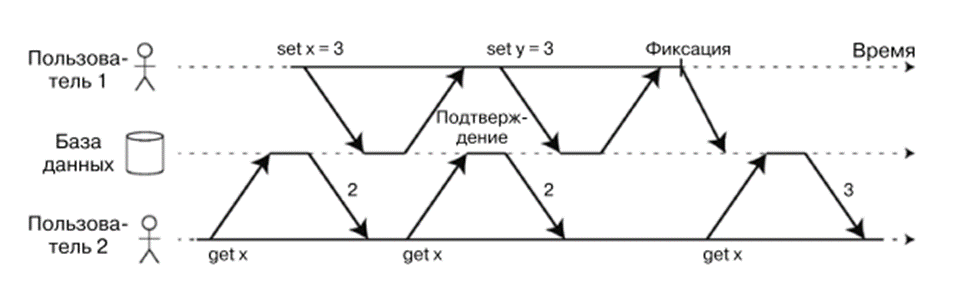
Read committed
Repeatable read
- At the beginning of the transaction, PostgreSQL makes a snapshot of the DB state.
- All subsequent queries of this transaction read the same consistent picture, regardless of what other transactions managed to commit.
- Therefore non-repeatable reads are absent — the same selection always returns identical data within the transaction.
- PostgreSQL’s Repeatable Read implementation prevents phantom reads
Serializable
It guarantees that even with concurrent execution of transactions, the result will remain the same as in the case of their sequential (one at a time) execution, without any concurrency.
- Reading transactions don’t interfere with each other — you can calmly read data while someone else is changing it.
- Parallel write transactions also don’t block each other if they work with different objects.
- Blocking occurs only when two transactions try to modify the same object simultaneously.
Here’s a very useful table from the official Postgres documentation
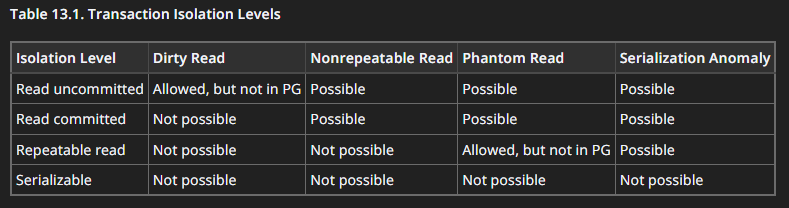
https://www.postgresql.org/docs/current/transaction-iso.html
Indexes
An index is an auxiliary structure stored with the table that helps quickly find needed records, speeding up data retrieval.
It’s important to note that indexes can also slow down adding, deleting, and modifying data, as these operations also require updating the corresponding indexes
Hash Indexes
Key-value storages work like dictionaries in programming languages. Usually implemented through hash tables, where each key corresponds to an address of the value in the data file.
When adding or updating a key-value pair, the hash table is updated to store the correct address. And to read a value, the system simply looks up the address in the hash table and accesses the file — fast and efficient.
SS-Tables and LSM-Trees
An SS-table (SSTable) is a file where keys are sorted and each appears only once. Such a structure facilitates merging segments even of large files without loading the entire table into memory, and works on the principle of merge sort.
To find a needed key, it’s not necessary to keep all indexes in memory: it’s enough to know neighboring keys and scan the file between them to the needed value.
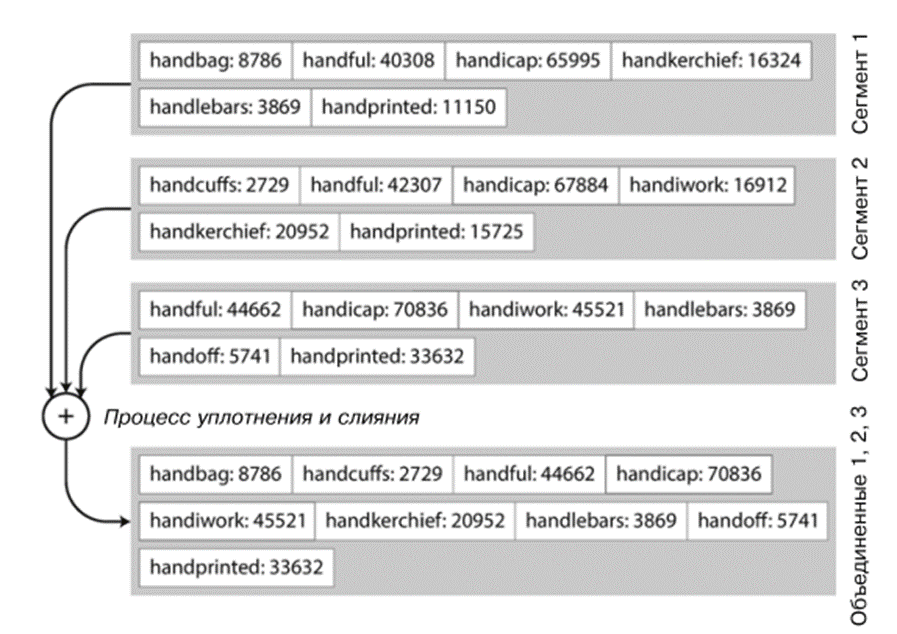 SS-tables and LSM-trees
B-Trees
B-tree is the most common index structure. Like SSTable, it stores key-value pairs in sorted form, which allows quickly searching for keys and performing range queries.
But unlike SSTable, B-tree divides data into pages of fixed size (usually 4 KB), which are read and written one at a time. Each page stores keys and references to child pages, forming a tree. Search always starts from the root page and goes through pages responsible for key ranges until the needed value is found.
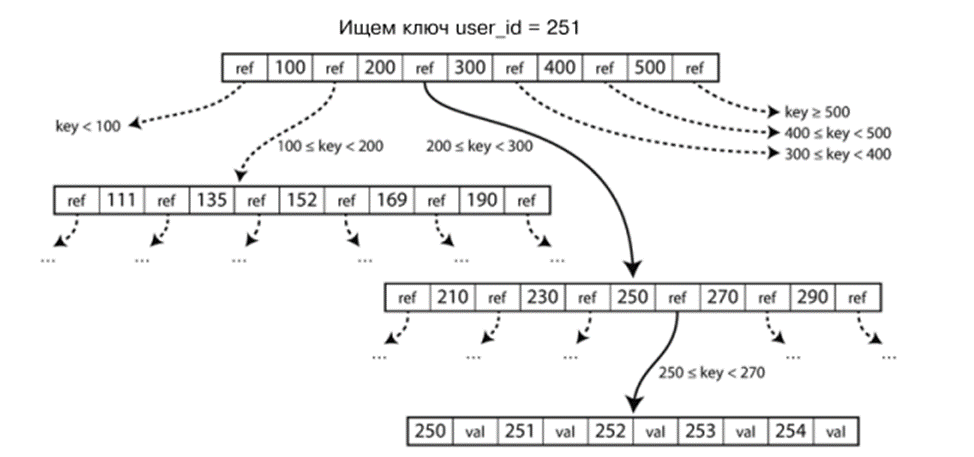
B-trees
Difference between indexes (user_id, status) and (user_id) INCLUDE (status)
Composite index (user_id, status)
-
**Structure**: Both fields are part of the index key -
**Sorting**: Data is sorted first by user_id, then by status -
**Usage**: Efficient for -- Queries with conditions on user_id
- Queries with conditions on user_id AND status
- Sorts by these fields
Index with INCLUDE (user_id) INCLUDE (status)
-
**Structure**: Only user_id in the index key, status is stored in the index leaves -
**Sorting**: Data is sorted only by user_id -
**Usage**: Efficient for:- Queries with conditions only on user_id
- Queries where both fields are needed (covering index)
- Does not support search/sort by status alone
Key differences
-
Size: INCLUDE-index is usually more compact -
Flexibility: Composite index supports more query types -
Performance: For queries with filtering by both fields, composite index works better -
Support: INCLUDE syntax is not available in all DBMS (appeared in PostgreSQL 11, SQL Server, etc.)
Algorithm for Adding Indexes
This is purely my algorithm, I’m not saying it’s the BEST ONE and there are no others)
Algorithm for Adding Indexes
- Determine indexing goal: need to understand for which operations or queries the index will be used. For example, this could be searching by a specific field, sorting, or merging data.
- Evaluate costs and benefits: conduct analysis of the current database structure and determine which data and operations will benefit from indexing. Evaluate costs for creating and maintaining the index.
- Query analysis: study typical queries that will be executed in the database and find out which fields or field combinations are most often used in WHERE or ORDER BY conditions. This will help determine which fields should be indexed.
- Avoid redundancy: creating indexes for every field is not always an effective solution. Determine field combinations that are frequently used in queries and create composite indexes for them.
- Determine sort order: for the field by which sorting or grouping will be performed, determine the order and create an index of the appropriate type.
- Determine uniqueness: if the field should contain only unique values, create a unique index for this field.
- Update and maintain index: consider that each operation of adding, updating, or deleting data affects indexing. Index updates can take time and resources, so it’s important to optimize this process.
- Monitoring and optimization: regularly monitor database and query performance. If performance decreases, consider the possibility of creating or modifying indexes to improve query execution.
Replication
Replication is copying data from one database to others.
- Why: for fault tolerance and high availability.
- Types: synchronous (data is written simultaneously to all replicas) and asynchronous (replicas are updated with delay).
- A replica can be used for reading, but writing goes to the master database.
Sharding
Sharding is horizontal division of data across different servers.
- Each shard contains part of the data (for example, by key range or hash).
- Allows system scaling: write and read load is distributed across multiple instances.
Partitioning
Partitioning is dividing a table within one database into logical parts (partitions).
- For example, by date: January, February, March.
- Simplifies search and can speed up some queries, but all data remains in one DB, unlike sharding.
SQL vs NoSQL
SQL (relational DB)
- Structure: tables with fixed columns and rows.
- Language: SQL, strict schemas.
- Guarantees: ACID, transactions.
- When to apply: complex relationships between data, strict consistency requirements, analytics, banks, ERP.
NoSQL (non-relational DB)
- Structure: documents, key-value, graphs, or columnar storages.
- Flexible schemas, horizontal scaling is easier.
- When to apply: large data volumes, high write load, fast key lookup, distributed systems, cache, logs, IoT.
When to Use DB Denormalization
Denormalization is the conscious merging of data that is usually stored in different tables to reduce the number of JOINs and speed up queries.
Used when:
- Frequently executing complex queries with many JOINs, and this becomes a performance bottleneck.
- Need read optimization in systems with high SELECT load.
- Can sacrifice write speed for faster reading (since updating denormalized data is more complex).
VIEW
- This is a virtual table that stores only the query, not the data.
- Data is retrieved from base tables each time it’s accessed.
- Plus: convenience, security, can hide complex JOINs.
- Minus: queries can be slower if base tables are large.
Materialized VIEW
- This is a real table that stores the query result.
- Cannot insert, update, or delete rows directly — changes happen only through
REFRESH MATERIALIZED VIEW. - Plus: fast data access, no need to recalculate the result with each query.
- Minus: needs to be periodically updated to keep data current
Conclusion
Today we covered key aspects of working with databases: table structure, indexes, transactions, queries. All this often comes up in interviews about SQL and working with DBMS. The topic list is based on my experience and the experience of colleagues who went through interviews for positions from Junior to Senior.